-
Last Revised: 01/22/26
-
Date Issued: TBD
-
Version: 2.0
-
Author: Solomon Abiola, Lauren Maffeo
Table of Contents
1.0 Purpose and Scope
This governance card forms foundational guidelines for use of AI-powered coding assistants within Maryland’s State government. It builds upon the State’s existing frameworks, including:
Maryland’s governance card on AI coding assistants applies to all Executive Branch agencies and all personnel (employees, contractors, and consultants) who develop, maintain, or leverage AI systems to provide services to the State. While agencies must adopt this guidance in its entirety, they can require more stringent guidelines based on their own operational context.
2.0 Definition and Autonomy Levels
AI-powered coding assistants use generative AI to suggest code completions, generate functions, or provide chatbot assistance. While these tools can increase productivity by automating boilerplate tasks, they do not replace developer expertise.
Developers remain 100% responsible for the final versions of any outputs that AI coding assistants produce. The State correlates risk with the level of autonomy per type of coding assistant:
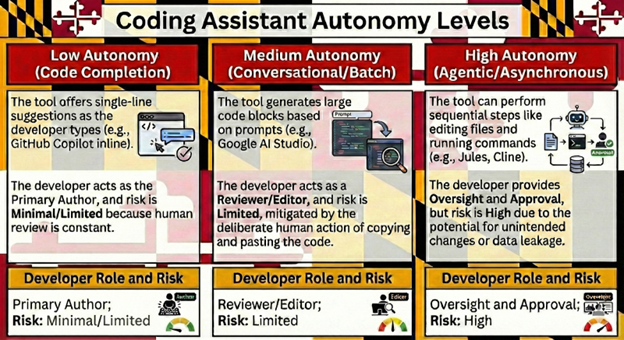
Low Autonomy (Code Completion):
The tool offers single-line suggestions as the developer types (e.g., GitHub Copilot inline). The developer acts as the Primary Author, and risk is Minimal/Limited because human review is constant.
Medium Autonomy (Conversational/Batch):
The tool generates large code blocks based on prompts (e.g., Google AI Studio). The developer acts as a Reviewer/Editor, and risk is Limited, mitigated by the deliberate human action of copying and pasting the code.
High Autonomy (Agentic/Asynchronous):
The tool can perform sequential steps like editing files and running commands (e.g., Jules, Cline). The developer provides Oversight and Approval, but risk is High due to the potential for unintended changes or data leakage.
3.0 Risk Classification
According to the standards in the State of Maryland’s AI risk assessment matrix, AI coding assistants are broadly classified as Limited Risk because they do not autonomously decide critical outcomes for individuals. Human developers and testers are the final decision-makers, because Maryland does not allow AI to make autonomous choices when used for State business.
However, the risk tier escalates to High if state staff gives coding assistants access to sensitive files, ask it to execute commands without explicit approval, or if the tool's privacy settings enable data training. Additionally, Maryland law prohibits using coding assistants from companies based outside of the U.S. (e.g., Mistral, Qwen) due to physical access control requirements.
4.0 Mandatory Developer Roadmap (Dos and Don’ts)
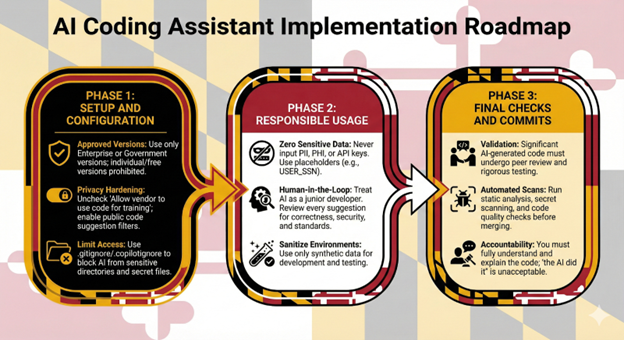
Phase 1: Setup and Configuration
-
Approved Versions: Use only
Enterprise or Government versions of coding assistants; individual or free versions often default to data training and are prohibited.
-
Privacy Hardening: You
must uncheck "Allow vendor to use code for training" and enable filters that block suggestions matching public code.
-
Limit Access: Write permissions files (e.g.,
.gitignore,
.copilotignore) to explicitly block the AI from reading sensitive directory segments or environment files containing secrets.
Phase 2: Responsible Usage
-
Zero Sensitive Data: Never input PII, PHI, or authentication secrets (API keys, passwords). If code must be generated for a sensitive field, use an abstract placeholder (e.g.,
USER_SSN).
-
Human-in-the-Loop: Treat AI as a junior developer: Helpful but potentially flawed. Review every suggestion for correctness, security vulnerabilities (like SQL injection or weak cryptography), and adherence to team style standards.
-
Sanitize Environments: Use only synthetic data for development and testing.
Phase 3: Final Checks and Commits
-
Validation: All significant AI-generated code must undergo peer review and rigorous unit/integration testing.
-
Automated Scans: Run static analysis (linters), secret scanning, and code quality checks before merging.
-
Accountability: Before committing,
you must fully understand the code and be able to explain how it works: “AI did it" is not an acceptable excuse for bugs or security incidents.
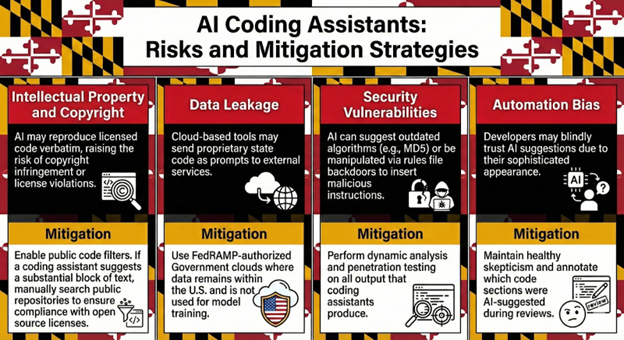
5.0 Risk Analysis and Mitigation
- 🟢
Approved (Government Versions):
-
Windsurf (Codeium): Preferred choice. The
Windsurf Government Cloud is FedRAMP High-authorized.
-
GitHub Copilot: Allowed via Enterprise. Requires mandatory opt-out of data training and use of public code filters.
-
Google AI Studio: Accessible via the State’s Google contract; requires access to an enterprise API key through the Maryland Department of Information Technology (DoIT)’s
intake process.
- 🟡 Experimental / Pilot Only:
-
Cursor: Not FedRAMP-authorized. Use only in sandboxes with CIO approval and
Privacy Mode (Zero Data Retention) enabled.
-
Jules: Allowed for experimental use in sandboxes only; requires a detailed security plan and CIO approval.
- 🔴 Restricted / Not Recommended:
-
Cline: High autonomous risk and lack of managed accountability; not for production use.
-
Free/Individual Versions: Prohibited for state business due to data training defaults.
7.0 Agency Compliance and Intake
All use of AI coding assistants must be documented in the State’s AI inventory per SB818. Agencies that wish to use unapproved coding assistants must request to use them through
DoIT’s intake process.
Once you
submit your intake request to use your coding assistant of choice, you will receive a questionnaire which asks questions about the tool’s
data ownership (State must retain all rights), data residency (U.S.-based only), and vendor indemnification for infringing code. Be prepared to answer these questions and explain this coding assistant is the best tool to fulfill your business use case.
Maryland’s AI subject matter experts may reach out during intake to share pre-approved coding assistants that you can use instead. If your proposed coding assistant is still the best fit for your use case, the Software Review Board at Maryland’s Department of Information Technology will assess it for approval to use when conducting State business.
8.0 Analogy for Understanding
Using an AI coding assistant is like using an advanced cruise control system. While the system can handle the monotony of the highway (boilerplate code), the driver (the developer) must keep their hands on the wheel and eyes on the road.
If the system suggests a dangerous lane change (a security vulnerability) or ignores a Private Property sign (copyright infringement), the driver is the one legally and practically responsible for the outcome.
The State of Maryland applies this same lens to coding assistants. We pledge to always use AI in service to State residents, employees, and organizations. That involves using AI like coding assistants to deliver state services more effectively. Keeping Maryland’s civil servants in the driver’s seat empowers the State to innovate responsibly.